
AI & Search
Structured Data: The Schema Types That Actually Do Something
Which Schema.org types earn rich results, how to connect them into a graph instead of isolated blocks, and the review markup that gets sites penalised.
Structured data has two jobs, and the second one has quietly become more important than the first.
Job one: earn rich results in search — star ratings, FAQ accordions, breadcrumbs, prices, event dates. These take more space in the results page and get clicked more.
Job two: tell AI models unambiguous facts about your business. A model reading your prose has to infer what you do and where you operate. A model reading your Organization node does not have to infer anything. When an answer engine states something about your company confidently, structured data is frequently where that confidence came from.
Job one is well documented. Job two is why implementations that were "good enough" three years ago are no longer good enough.
Use JSON-LD
Three formats exist. Use JSON-LD.
Google explicitly recommends it, it lives in a single <script> tag instead of being woven through your markup, and it survives template refactors that would silently break Microdata. There is no reason to start a new implementation in anything else.
<script type="application/ld+json">
{
  "@context": "https://schema.org",
  "@type": "Organization",
  "@id": "https://example.com/#organization",
  "name": "Acme Manufacturing",
  "url": "https://example.com/"
}
</script>
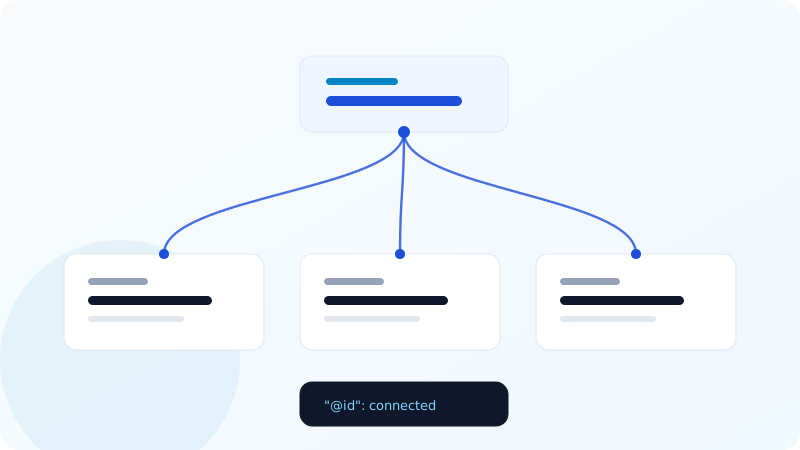
Connect the graph
This is the difference between an implementation that works and one that merely validates.
Most sites publish isolated blocks: an Organization here, a Service there, a BlogPosting somewhere else, none of them referencing each other. Each validates. Together they say nothing about how they relate.
Use @id to link them:
{
  "@context": "https://schema.org",
  "@graph": [
    {
      "@type": "Organization",
      "@id": "https://example.com/#organization",
      "name": "Acme Manufacturing",
      "url": "https://example.com/"
    },
    {
      "@type": "WebSite",
      "@id": "https://example.com/#website",
      "url": "https://example.com/",
      "publisher": { "@id": "https://example.com/#organization" }
    },
    {
      "@type": "Service",
      "@id": "https://example.com/services/cnc/#service",
      "name": "CNC Milling",
      "provider": { "@id": "https://example.com/#organization" },
      "areaServed": { "@type": "Place", "name": "European Union" }
    }
  ]
}
Now the service is attached to a specific organisation with a specific service area. A machine can answer "who provides CNC milling and where do they operate" from the markup alone. With three disconnected blocks, it cannot.
The @graph wrapper lets you publish the whole set in one script tag, which is cleaner than several and makes the relationships obvious to whoever maintains it next.
The types worth having
In rough order of value for a typical business site:
Organization (or LocalBusiness if you serve a physical area, or ProfessionalService for agencies and consultancies). This is the anchor. Include name, url, logo, address, telephone, email, sameAs pointing at your real social profiles, and areaServed.
WebSite — once, on the homepage. Adding potentialAction with a SearchAction can earn a sitelinks search box.
BreadcrumbList — on every page below the homepage. It replaces the raw URL in search results with a readable path. This is the easiest rich result to earn and one of the most commonly skipped.
Service or Product — on the pages that describe them. Product with offers and a real price is what produces price display in results.
FAQPage — wherever you answer questions. This is disproportionately valuable for AI retrieval because it is literally question-and-answer pairs in a format built for extraction.
BlogPosting or Article — on editorial content. Include headline, datePublished, dateModified, author, image and wordCount.
LocalBusiness with openingHoursSpecification and geo — if you have a physical location customers visit.
The mistake that gets sites penalised
Do not put aggregateRating on your own Organization node using reviews you collected yourself.
Google's structured data policy is explicit: self-serving reviews about your own organisation are ineligible for rich results. It is a documented cause of manual actions, not a grey area.
Ratings belong on Product, LocalBusiness or specific services, and they should reflect genuine review collection with the reviews visible on the page. If the star rating in your markup does not exist anywhere a human can see it, you have a policy problem regardless of how the markup validates.
Requirements that are easy to miss
The marked-up content must be visible on the page. Marking up an FAQ that is not rendered, or a price that only appears after adding to cart, is a violation. Google checks this and rich results are withdrawn when it finds a mismatch.
Required properties are actually required. Google's rich result documentation lists required and recommended properties per type. Missing a required one means no rich result at all, even though the markup is valid Schema.org. Product needs name and either offers, review or aggregateRating. FAQPage needs at least one Question with an acceptedAnswer.
Dates need ISO 8601 format. 2026-09-08 or 2026-09-08T10:00:00+03:00. September 8, 2026 is not parsed.
sameAs should point at profiles you control — your actual LinkedIn, your actual X account. It is one of the strongest entity-disambiguation signals available, and pointing it at a Wikipedia article about a different company is worse than omitting it.
For AI retrieval specifically
A few properties matter more for models than for search:
descriptionon yourOrganization, written as a factual sentence rather than a slogan. Models quote this.knowsAbout— an array of topics your organisation has expertise in.areaServed— explicitly, rather than leaving it to be inferred from your address.availableLanguage— if you serve multiple markets.makesOffer— connecting your organisation to the services it sells.
None of these produce a rich result. All of them make it more likely a model describes you accurately rather than guessing.
Multilingual sites
Each language version needs its own structured data with translated values, and inLanguage set correctly. The @id values should differ per language — https://example.com/de/leistungen/#service, not a shared ID — or you are asserting that the German and English services are the same node, which conflicts with your hreflang.
Checking your own
Three tools, and they answer different questions:
- Google's Rich Results Test — will this earn a rich result?
- Schema.org Validator — is this valid Schema.org?
- Our free structured data checker — what is actually on the page, does it parse, is the graph connected, and is there self-serving review markup?
The third question is the one the first two do not answer, and it is where most implementations fall down.
A realistic sequence
- Publish a connected
Organization+WebSitegraph sitewide. - Add
BreadcrumbListto every page below the homepage. - Add
ServiceorProductto the relevant pages, referencing the organisation by@id. - Add
FAQPagewherever you genuinely answer questions. - Add
BlogPostingto editorial content. - Audit annually, because markup drifts out of sync with pages faster than anyone expects.
Step 6 is the one that gets skipped, and stale structured data is worse than none — it is a confident, machine-readable assertion that happens to be false.
Open tool Structured Data Extract every JSON-LD block on a page, validate it, and see which rich-result types you qualify for.